
Introduction
Learn the basics of the RVE SDK and start building your own video editor
The RVE SDK is a production-ready React component library for building video editors. The idea is simple: you shouldn't have to build a video editor from scratch. Drop in our components, wire up rendering, and you've got a fully working editor inside your own app.
It's built for teams who want full control over the editing experience without starting from zero.
You should be here if you're:
- Adding a video editor to an existing product
- Building a standalone editing tool with your own branding
- Prototyping a video-first feature and want to move fast
- Looking for a component library, not a full app template
What You Get
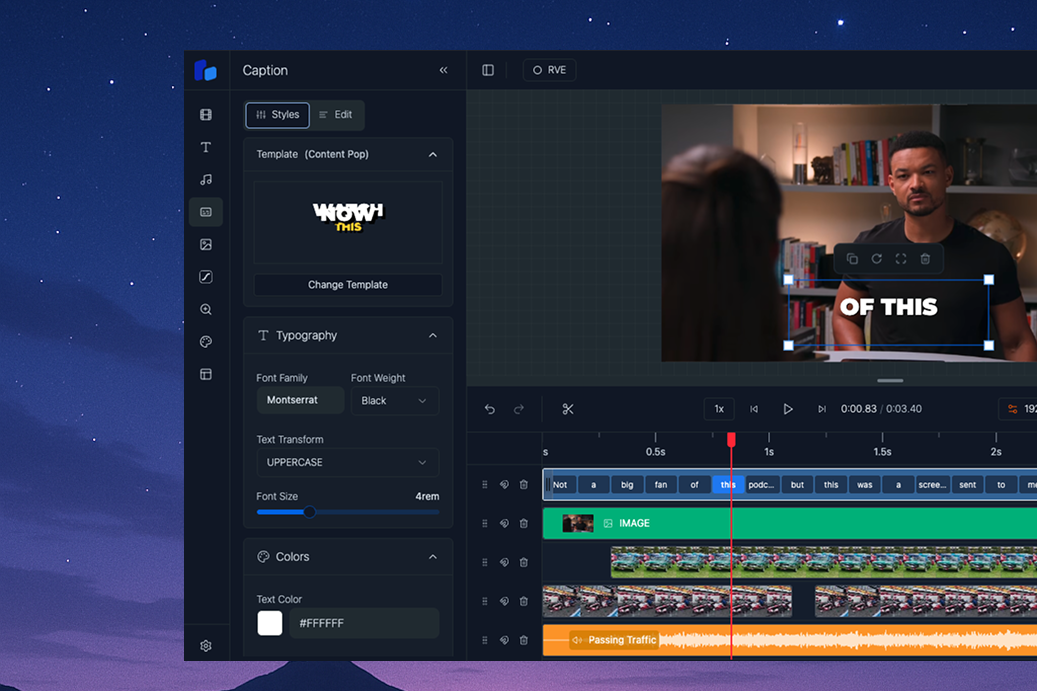
The SDK gives you the full editor interface in one React component, ReactVideoEditor. It contains the player, the sidebar, the editor header, and the multi-track timeline. You configure these parts with props. The timeline, the sidebar, and the header are not separate components that you can import.
Editor features
- Multi-track timeline - drag and drop, split, snapping, and keyboard shortcuts
- Media panels - video, images, audio, text, captions, shapes, Lottie, zoom, backgrounds, and templates
- Shapes - rectangles, ellipses, arcs, lines, particles, and paper, with gradients and shadows
- Keyframe animation - animate position, size, rotation, opacity, scale, blur, masks, and more
- Templates - editable built-in templates in Charts, Explainers, Logo stings, and Showcase
- Lottie animations - add Lottie files from a library or an upload
- Captions with animated styles - word-level caption animations and a template picker
- Google Fonts - the full Google Fonts list for text and captions
- Screen Recorder mode - backgrounds, camera layouts, cursor playback, and cursor-follow zoom for screen recordings
Export and integration
- Browser export - video export in the browser with WebCodecs, with resolution and quality settings. No server is necessary.
- Cloud Rendering integration - managed production rendering for products, automations, AI agents, and high-volume work
- HttpRenderer - an optional utility that connects your editor to a server rendering backend
- Media adaptors - built-in Pexels adaptors for stock video and images
- Whisper transcription adaptor - AI caption generation through a server route that you own. See Setup Captions.
- Data model - the
EditorStateJSON that you save, load, and render - Theming - light, dark, and RVE themes, plus full whitelabelling
What You Provide
The SDK is a React component library, not a full application. You're responsible for:
- A React application - Next.js, Vite, or any React setup
That is all you need for the first export. The SDK includes client-side rendering by default. For production products, large batches, automations, or AI agents, connect the SDK to RVE Cloud Rendering.
Zero server setup required
You do not need a rendering server to get started. The SDK renders video in the browser with WebCodecs. RVE Cloud Rendering is the recommended production option. Self-managed SSR and Lambda remain available when your team must own the infrastructure.
How It Works
Your React App
├── <ReactVideoEditor />     ← SDK component (handles all editing UI)
│   └── Built-in WebCodecs    ← renders video in the browser when user clicks "Export"
│
└── Optional: Your Server     ← protects the Cloud Rendering API key
    ├── POST /api/render      ← forwards a managed render request
    └── POST /api/progress    ← returns render progress and completion
The user edits in the browser. A simple export can run on the user's device. For production work, a custom renderer sends the job through your server to RVE Cloud Rendering.
Quick Example
'use client';

import { ReactVideoEditor } from '@reactvideoeditor/react-video-editor/react-video-editor';
import '@reactvideoeditor/react-video-editor/styles.css';

export default function Home() {
  return (
    <ReactVideoEditor
      projectId="my-first-project"
      fps={30}
      disabledPanels={[]}
      defaultTheme="dark"
      showDefaultThemes={true}
      sidebarWidth="clamp(350px, 25vw, 500px)"
      sidebarIconWidth="57.6px"
      showIconTitles={false}
    />
  );
}
That's it. The editor will render with all default panels, a dark theme, autosave to IndexedDB, and client-side video export out of the box. No server endpoints needed.
Next Steps
- Installation - purchase a plan and install the SDK via npm
- Quick Start - get a working editor on screen
- Client-Side Rendering - how browser export works (enabled by default)
- Choose a Rendering Method - compare browser, managed cloud, and self-managed rendering
- RVE Cloud Rendering - set up managed rendering for production scale