Remotion Transitions vs React Video Editor: Package, Effects, or Full Editor Workflow?
A direct answer for teams searching for Remotion transitions, animations, and effects - including what the Remotion transitions package gives you, where it stops, and when you need a fuller editor layer.
Sam
Creator of RVE
If you are searching for Remotion transitions, the short answer is this:
- Remotion gives you transition primitives, animation utilities, and code-first control over scene changes
- React Video Editor is the layer you reach for when you need those transitions inside a usable editor workflow
That distinction matters because most teams are not actually trying to buy “transitions” by themselves.
They are usually trying to solve one of two problems:
- animate scenes and overlays in code
- let users control transitions inside a browser video editor
Those are related, but they are not the same product requirement.
Key takeaways
- Remotion transitions are excellent when your team wants code-level control over scene changes, animation timing, and rendering behavior.
- Searches like `remotion animations`, `remotion effects`, and `remotion transition package` often hide a second need: real editing UX around those animations.
- If users need to choose, preview, and manage transitions inside your app, you usually need a fuller editor layer on top of the animation primitives.
If your question starts one layer higher, read Remotion Library vs React Video Editor. If you are still sorting out the broader engine-vs-editor distinction, read Remotion vs React Video Editor.
What people usually mean by “Remotion transitions”
The phrase Remotion transitions often bundles several different intents together:
- “How do I animate between scenes in Remotion?”
- “Does Remotion include a transitions package?”
- “Can I get reusable transition effects without building everything from scratch?”
- “Can users pick those transitions in my React app?”
That is why the search cluster often overlaps with:
- remotion transitions
- remotion animations
- remotion effects
- remotion animation library
- remotion video editor
The first few are package-level or implementation-level questions.
The last one is usually a workflow question.
What Remotion transitions actually give you
Remotion is strong when you want transitions as part of a code-driven rendering system.
That means you can:
- define scene changes in React
- control animation timing frame by frame
- build reusable transition components
- compose transition logic with templates and overlays
- keep preview and render behavior aligned around the same composition model
That is a very good fit for teams building:
- programmatic video generation
- reusable templates with animated intros/outros
- internal creative tooling for developers
- video products where engineers own animation behavior directly
But here is the important limit:
Remotion transition primitives do not automatically become a complete editor experience.
By themselves, they do not guarantee:
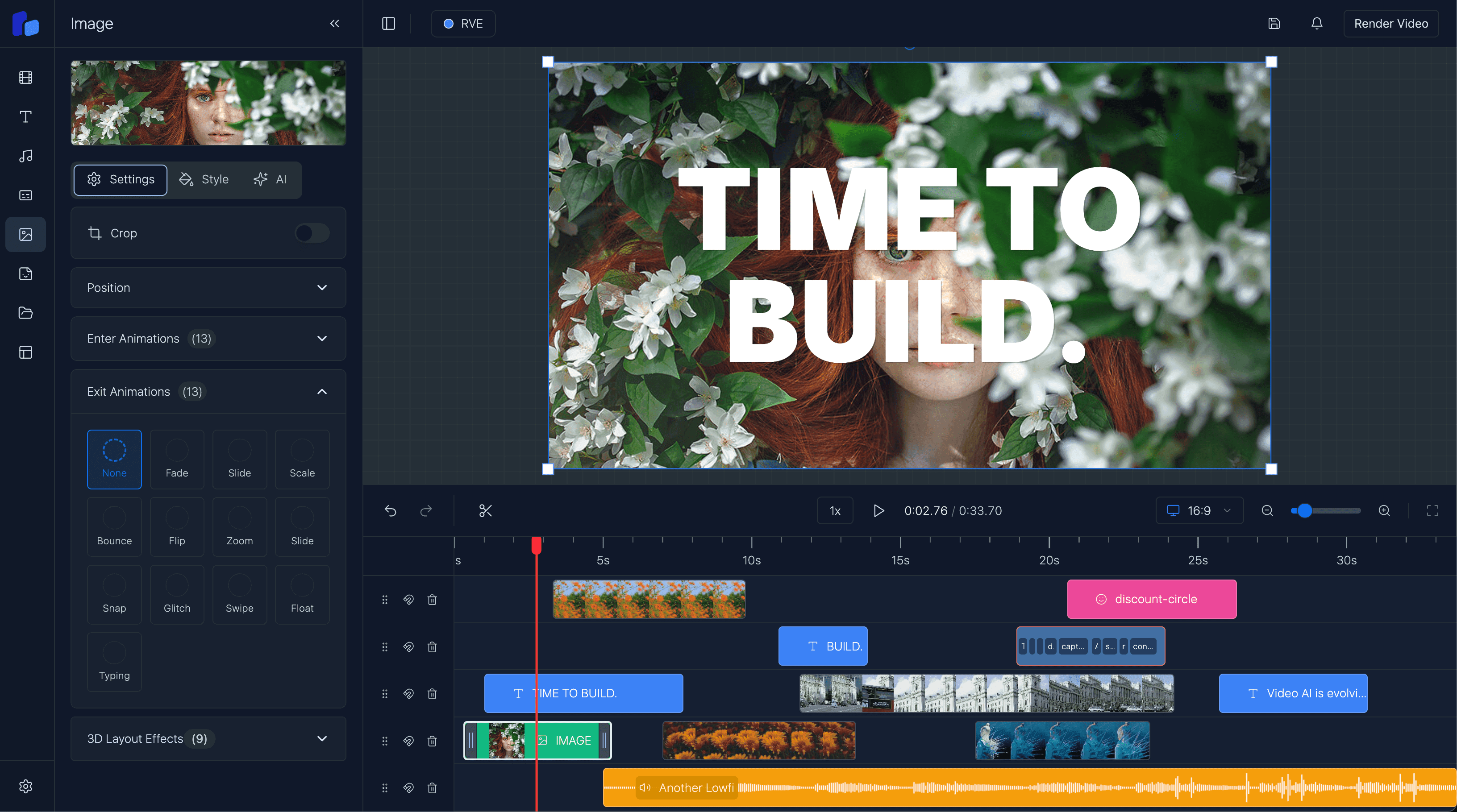
- a timeline UI for choosing and placing transitions
- visual controls for duration, easing, and sequencing
- non-technical users being able to edit safely
- project persistence around transition choices
- product workflow around uploads, approvals, and exports
Option A
Choose Remotion transitions directly when...
- Your team wants animation and transition behavior defined in code.
- Developers are comfortable wiring transition logic into templates and compositions.
- The main goal is rendering control, not a polished end-user editing surface.
Option B
Choose a fuller editor layer when...
- Users need to select, tweak, and preview transitions inside your app.
- You need timeline UX, overlays, captions, and transition controls to work together.
- The costly part is not the effect itself - it is the full editing workflow around it.
Why “animations” and “effects” can be misleading
Searches for Remotion animations and Remotion effects sound like asset questions.
Usually they are architecture questions in disguise.
A team starts by asking for an animation library. Then they realize the real product requirement is:
- assign transitions to clips
- preview them in context
- let editors change them later
- store those choices in project state
- export reliably with the same timing
That is the gap between:
- having animation primitives
- shipping a browser video editor that real users can operate
A package solves the first problem. An editor workflow solves the second.
What Remotion transitions are genuinely great at
- Code-first control over scene transitions and animation timing.
- Reusable transition logic for templates and programmatic video workflows.
- A clean fit with React-based composition and render pipelines.
What they do not solve by themselves
- They do not automatically create an embedded editor UI.
- They do not remove the need for timeline interactions and saved project state.
- They do not answer how non-technical users will control transitions inside your product.
Where React Video Editor fits
React Video Editor is useful when your transition question is really an editor product question.
That usually means you need:
- a timeline where clips and overlays stay synchronized
- transition controls inside the editing interface
- playback that reflects what users actually configured
- room for templates, captions, overlays, and asset management
- an embedded editor surface that feels native inside your React or Next.js app
If your main goal is to let users work with transitions rather than just let engineers code them, that is the layer you should evaluate.
For the product-facing angle, also see the React transitions feature page and How to Build a Video Editor with Remotion and Next.js.
The practical way to choose
Use this shortcut:
You probably want Remotion transitions directly if...
- your team is comfortable writing transition logic in React
- you want code-level control over animations and scene changes
- templates and rendering are the priority
- the editor UI is either internal or still being built separately
You probably want React Video Editor if...
- users need transition controls inside your app now
- timeline editing matters as much as rendering
- you want transitions to live beside captions, overlays, and project state
- the expensive part is shipping a trustworthy editor workflow, not inventing a fade effect
You may want both if...
- you want Remotion as the composition/rendering layer
- but you do not want to build every editing interaction from zero
That is often the real stack behind Remotion video editor search intent.
FAQ
Does Remotion have transitions?
Yes. Remotion provides ways to animate between scenes and build reusable transitions in a React-based rendering workflow.
Is Remotion a transitions library or a video editor?
It is better understood as a rendering/composition system that can include transitions. It is not the same thing as a full browser video editor by itself.
Are Remotion animations enough for a product?
Sometimes, if engineers are building the whole product layer around them. But most end-user products still need timeline UX, saved project state, and editor controls on top.
What is the difference between Remotion transitions and React Video Editor transitions?
Remotion focuses on the code-first animation/rendering layer. React Video Editor focuses on the embedded editing workflow where users actually work with transitions inside an app.
If I want a Remotion video editor, what am I actually looking for?
Usually either a code-first composition engine, a starter implementation path, or a fuller embedded editor workflow. The right choice depends on how much editor UX your team still wants to build itself.
Next step
Separate the animation-package question from the editor-workflow question
If your team is searching for Remotion transitions, decide whether you mainly need code-level animation control or a user-facing editor workflow that manages transitions inside your product.