White-Label Video Editor in React
A practical guide for teams that need a white-label video editor in React with their own branding, workflow, permissions, and rendering pipeline.
Sam
Creator of RVE
If you need a white-label video editor in React, the real requirement is usually not "hide someone else's logo."
It is owning the buyer-facing product experience while avoiding a multi-quarter rebuild of timeline, captions, overlays, uploads, and rendering infrastructure.
That distinction matters.
A lot of teams searching for a white-label editor are really asking for four things at once:
- the editor should look like their product
- the workflow should fit their product
- users should stay inside their product
- engineering should not disappear into editor infrastructure work
If you are earlier in the evaluation, also read React Video Editor for SaaS, Build vs Buy a Video Editor, and How to Build a Video Editor in React.
What "white-label" should actually mean
For an embedded React editor, white-label should mean you can control the parts buyers and users experience directly:
- branding and visual styling
- navigation and product shell
- templates and workflow steps
- permissions, plans, and feature gating
- project persistence and customer data connections
- export triggers and downstream delivery
That is much more important than a simple skin.
If the product still feels bolted on, the white-label promise is weak even if the colors match.
The strongest use cases for a white-label React video editor
SaaS platforms
A SaaS company may want video editing inside an onboarding flow, campaign builder, creator workflow, customer portal, or internal content system.
The editor needs to inherit the app's structure instead of behaving like a separate tool.
AI video products
AI-generated drafts usually still need human review, caption edits, scene swaps, branding fixes, and export control.
That means the editor should feel native to the generation workflow rather than like an external handoff. If that is your path, read React Video Editor for AI Video Apps.
Agency and multi-tenant products
Agencies, partner platforms, and multi-tenant SaaS tools often need account-level branding, template control, and distinct user permissions.
That is where React-native customization matters a lot.
Internal enterprise tools
Internal teams often care less about a public creative-suite brand and more about keeping review, compliance, and asset workflows inside one controlled application.
What teams usually underestimate
Teams often assume a white-label editor project is mostly a UI theming exercise.
Usually the hard part is everything around that surface:
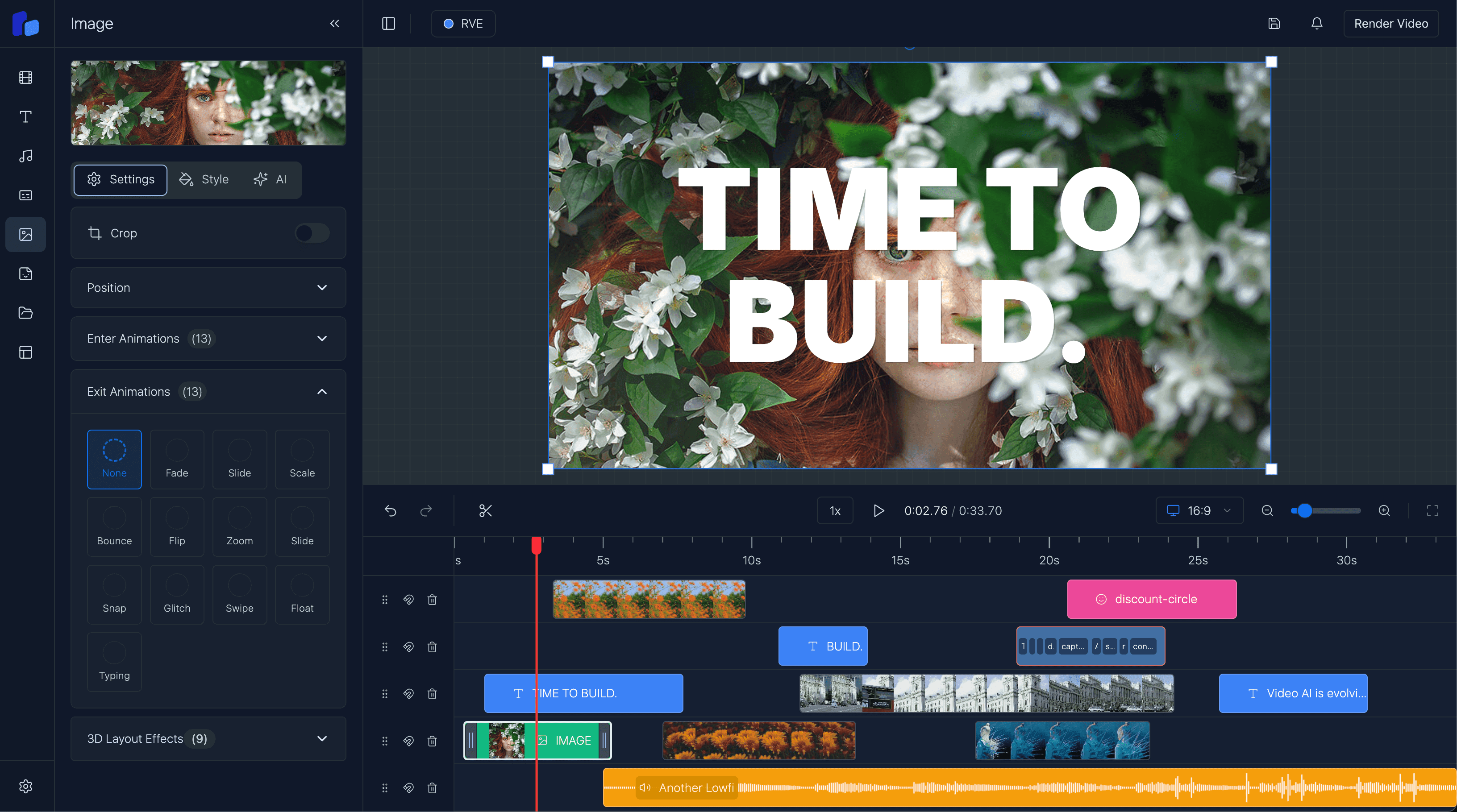
- timeline behavior users can trust
- captions, overlays, and clip manipulation
- upload flows and storage references
- autosave and durable project state
- preview that matches export output
- rendering jobs and failure handling
- template systems that support repeatable output
That is why "white-label" often turns into a build-vs-buy decision faster than expected.
What you should still own even if you do not build from scratch
Using a React editor foundation should still let your team own the product-specific parts:
- auth and user roles
- billing and packaging
- customer-specific templates and presets
- integrations with your own APIs and storage
- review and approval workflows
- product analytics and conversion paths
- the surrounding UI and information architecture
The goal is not to outsource your product.
The goal is to avoid rebuilding the undifferentiated infrastructure under it.
Where React Video Editor fits
React Video Editor is a good fit when you want the editor to live inside your React app instead of beside it.
That matters for white-label use cases because the real value is usually:
- keeping users in your own app shell
- matching your product's branding and navigation
- connecting editing to your own workflow logic
- controlling templates, assets, and export behavior
- shipping sooner without giving up product ownership
If you are comparing this path against a from-scratch build, read Build vs Buy a Video Editor. If your main need is embedded editing for a broader product, read React Video Editor for SaaS.
A practical evaluation checklist
Before choosing a white-label editor approach, ask:
Can we make the editor feel native to our app?
If the answer is no, the integration may still feel like a bolt-on.
Do we need visual control only, or workflow control too?
Most serious products need both.
Is the editor itself our moat?
If not, building the entire stack from scratch is often the expensive answer to the wrong question.
What does our team need to ship this quarter?
If speed matters, a React-native foundation is usually the more practical path.
FAQ
What is a white-label video editor in React?
It is a video editor embedded inside a React product where the company controls branding, workflow, surrounding UI, and product integrations instead of sending users to a separate external tool.
Is white-label the same thing as just changing colors and logos?
No. Real white-label behavior usually includes workflow integration, navigation control, account-specific permissions, templates, and product-native delivery paths.
Who usually needs a white-label React video editor?
SaaS teams, AI video products, agency platforms, and internal enterprise tools are common fits because they need editing inside a broader workflow rather than as a standalone destination.
How is this different from the general SaaS page?
The SaaS page is broader. This page is specifically for teams evaluating branding, embedded UX ownership, multi-tenant fit, and product-native workflow control under a white-label requirement.
Final thought
The best white-label video editor is not the one that looks the most customizable in a demo.
It is the one that lets your product keep its identity, keeps users in your workflow, and avoids turning your roadmap into a long detour through editor infrastructure.