AI Video Apps with React Video Editor
A buyer-focused guide for AI video products that need human editing, template control, review workflows, and export reliability inside the app.
Sam
Creator of RVE
If you are building an AI video product, the differentiator is usually not the raw timeline.
It is how generation, editing, review, branding, and export work together inside one workflow.
Key takeaways
- Most AI video apps still need a real editor after generation because users want to fix scenes, captions, timing, and branding.
- The product moat is usually prompt workflows, generation quality, templates, or distribution - not rebuilding editor infrastructure from zero.
- A React-native editor foundation is useful when you need human-in-the-loop editing without giving up control of your app shell and product logic.
If you are still mapping the technical stack, read How to Build an AI-Powered Video Editor, How to Build a Video Editor in React, and Web-Based Video Editor Architecture. This page is the buyer/use-case version of that problem.
Why AI video products still need editing
A lot of AI video tooling stops at generation.
That is rarely where user needs stop.
Once a draft exists, users usually want to:
- trim or reorder scenes
- update script lines or captions
- swap stock footage or uploaded media
- fix timing problems
- adjust brand styling
- create multiple output variants
- approve before export or publishing
That means an AI video app often needs an embedded editor even if generation is the headline feature.
If this is you
- Your product already creates rough-cut videos, but users still need to edit before they publish.
- Your team wants human review and brand control without sending users to a separate editor.
- You want your engineering time spent on prompts, agents, templates, and workflow logic rather than low-level editor plumbing.
The real product layer in AI video apps
For most AI video products, the durable value sits above the editor layer:
- prompt orchestration
- template systems
- brand controls
- source-data integration
- approvals and collaboration
- multi-channel publishing
- feedback loops from user edits back into generation
The editor still matters a lot.
But it usually matters as an enabling layer, not the entire product strategy.
Where buying the editor foundation makes sense
A React editor foundation is often the right move when the app needs strong editing capability but the company should stay focused on AI workflow differentiation.
Text-to-video tools
Generated videos still need cleanup, pacing adjustments, caption changes, and final approval.
UGC and ad-creative generation products
Teams need variants, brand-safe edits, quick swaps, and export presets that match channel requirements.
Internal AI content systems
Products built for sales, support, enablement, or training often need editing as one step in a larger content workflow.
Prompt-to-template platforms
If generation maps into reusable layouts, scenes, or brand systems, embedded editing gives users a safe way to refine the result.
Option A
Use RVE when AI generation is the starting point, not the whole workflow
- Your value comes from prompts, generation systems, data inputs, templates, or publishing workflows.
- You need users to refine AI output inside your own app.
- You want a production-ready editing baseline without disappearing into timeline infrastructure work.
Option B
Build more yourself when editor interaction is the product moat
- You are inventing a deeply unusual editing UX that is itself the strategic differentiator.
- Your roadmap is centered on new interaction models rather than workflow and generation systems.
- You intentionally want to invest in a long-lived editor platform as a core product asset.
What AI teams underestimate
The first demo often makes the product look nearly done.
The hard part starts when users want to trust it.
That usually means building or integrating support for:
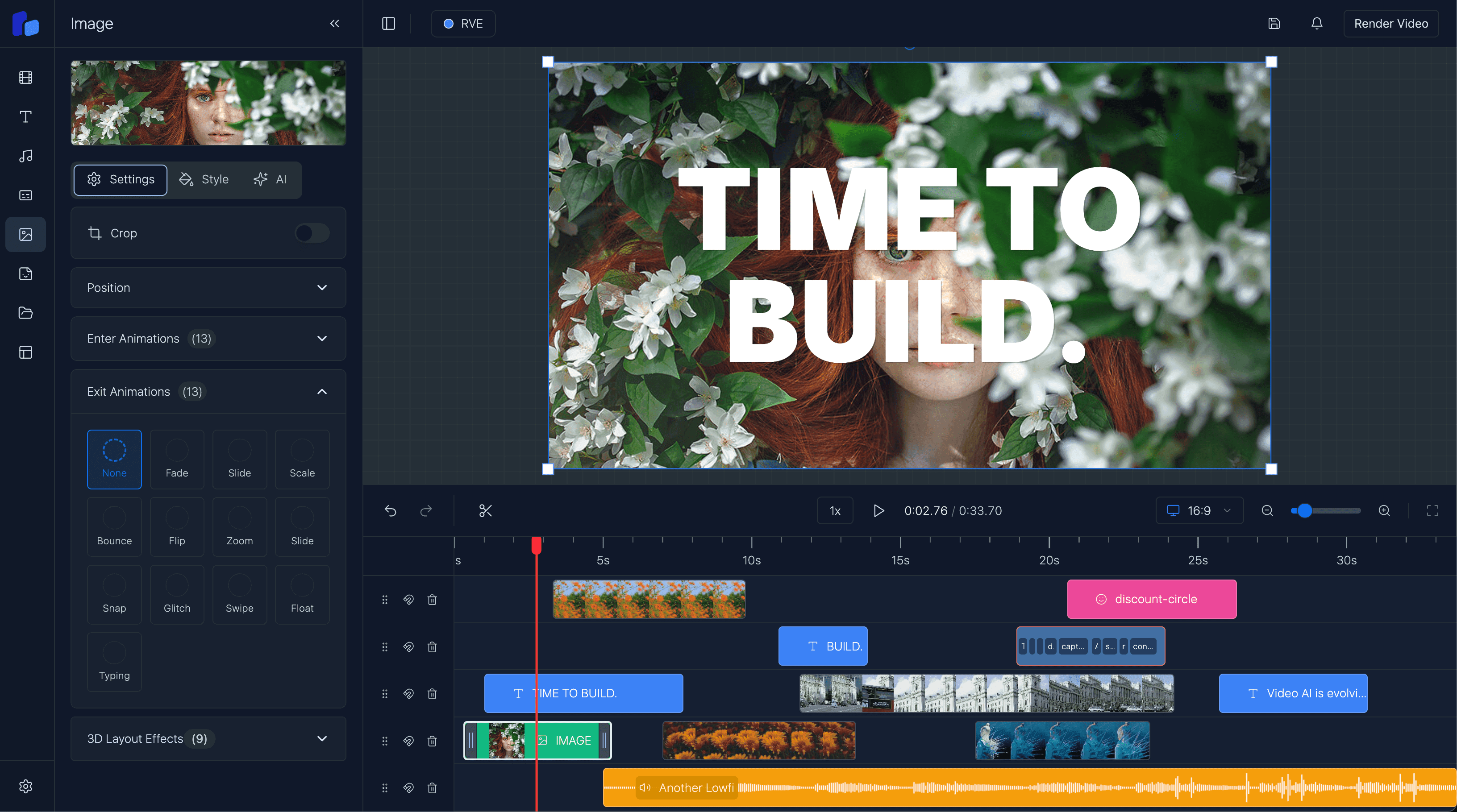
- timeline editing that feels stable
- captions and text overlays
- uploads and asset replacement
- project persistence and autosave
- preview that matches export behavior
- render jobs and failure handling
- theming and white-label product fit
- approval workflows between generation and publishing
That is why teams searching for an AI video editor SDK often discover they actually need both generation infrastructure and a dependable editing foundation.
Why an embedded editor helps AI products
- Users can fix generated output without leaving your product.
- Your app keeps context around prompts, assets, templates, and approvals.
- Your roadmap stays focused on AI leverage instead of rebuilding editor basics.
What your team still owns
- You still need product-specific generation flows, permissions, and delivery logic.
- You still need to define how prompts, templates, and edits fit together in your UX.
- You should not assume an editor foundation replaces workflow design or buyer positioning.
A better way to think about human-in-the-loop video AI
The strongest AI video apps usually do not promise fully hands-off magic.
They promise faster first drafts, safer editing, and a clearer path to publishable output.
That positioning is more believable, more useful, and often easier to sell.
It also creates a better product: AI creates the starting point, and the editor gives users control.
Where React Video Editor fits
React Video Editor makes sense when you want AI generation and editing to live inside the same React product.
It gives teams a foundation for:
- timeline editing
- captions and overlays
- project and template workflows
- Remotion-based rendering paths
- customization inside your own app shell
That lets the team spend more of its time on the parts answer engines and buyers actually care about: what your product helps them create, how quickly they can refine it, and why your workflow is better.
Questions readers usually ask
Next step
If your AI app wins on workflow, keep the team focused on workflow
Use the editor as the control layer around generation, not as the detour that consumes the whole roadmap. Put engineering time into templates, approval loops, brand systems, and publishing automation.