Open Source React Video Editor: What You Get, What You Still Need
A practical guide to evaluating an open-source React video editor, including what is actually free, what still needs engineering work, and when to use React Video Editor's open-source vs Pro paths.
Sam
Creator of RVE
If you are looking for an open-source React video editor, the important question is not just whether code is public.
It is how much editing workflow you get immediately, and how much product work you still need to own yourself.
Key takeaways
- An open-source React video editor can save months of baseline UI and workflow work, but it does not remove the need for product-specific integration, persistence, and rendering decisions.
- The best fit is usually teams that want a visible head start without pretending the whole media stack is magically solved.
- For React Video Editor specifically, the real decision is often open-source baseline vs Pro/commercial path depending on how much functionality and support your product needs.
If you are still mapping the broader decision, also read Build vs Buy a Video Editor, How to Build a Video Editor in React, and Remotion vs React Video Editor.
What people usually mean by “open-source React video editor”
Most buyers are not asking for source code access just for philosophical reasons.
Usually they want a mix of:
- a visible starting point they can inspect and extend
- React-native components instead of a closed external editor
- faster implementation of timeline and editing UX
- confidence that the editor can fit their own product shell
- less risk than building every media interaction from zero
That means the search intent often overlaps with:
- react video editor open source
- react video editor library
- browser video editor react
- open source video editor in javascript
What open source does help with
A strong open-source baseline can help teams skip the slowest “blank canvas” stage.
That usually means starting with real UI patterns and editing primitives instead of inventing them from scratch:
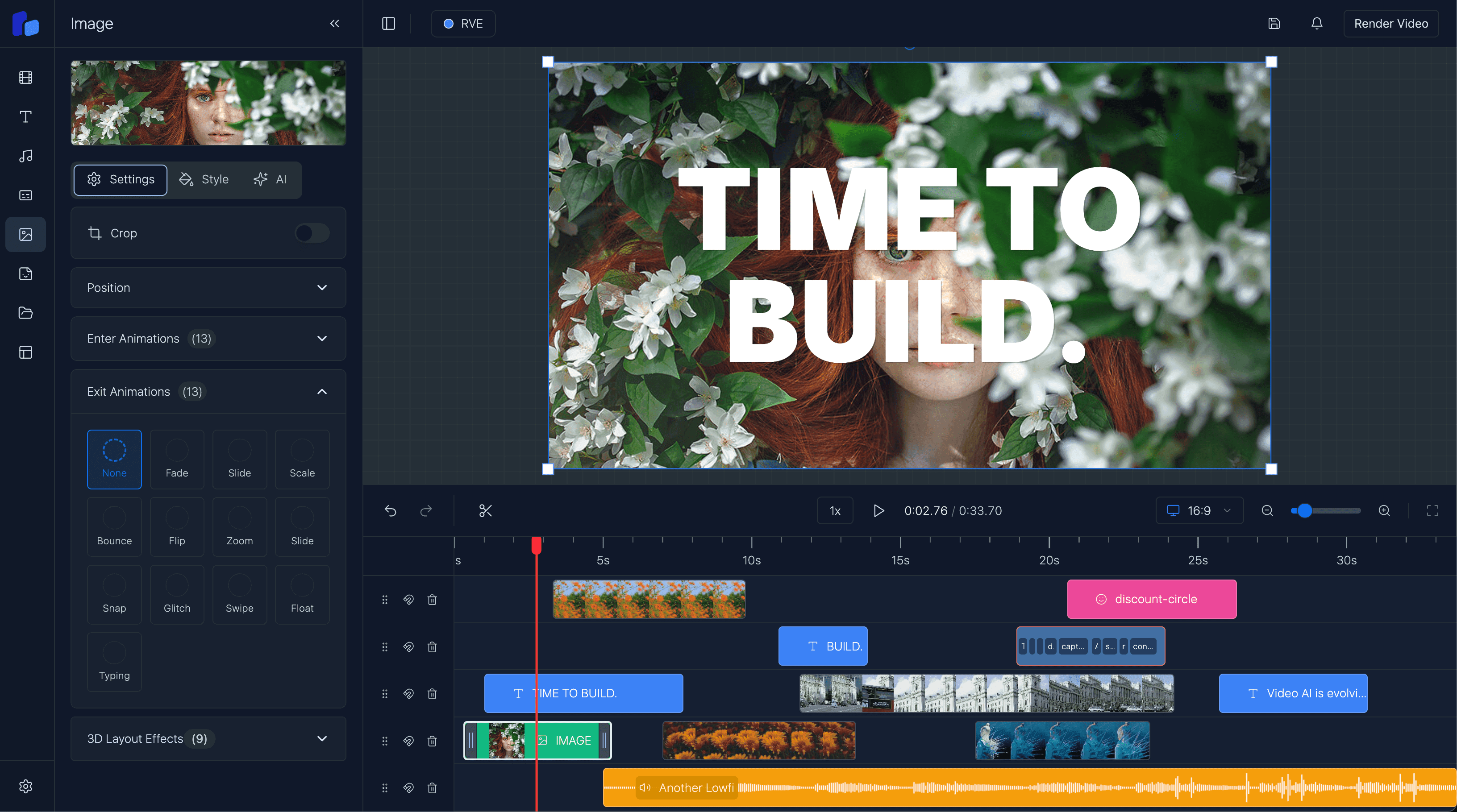
- timeline layout and interaction patterns
- overlays, captions, and sequencing concepts
- component structure that fits a React codebase
- implementation patterns your engineers can inspect directly
- a clearer path for theming and integration
That is valuable because video-editing UX gets complicated earlier than most teams expect.
What open source does not automatically solve
This is the part many teams underestimate.
Even with an open-source React video editor, you still need product work around it:
- uploads and storage references
- auth, roles, and billing logic
- autosave and durable project persistence
- rendering jobs and export delivery
- product analytics and conversion paths
- workflow-specific templates and approvals
- edge cases around media failure, retries, and long sessions
Open source shortens the path.
It does not eliminate the path.
Why open source is attractive
- You can inspect the code and understand how the editing surface is built.
- Your team gets a React-native starting point instead of a black-box editor.
- You can move faster on product-specific workflow work because the baseline is visible and adaptable.
What your team still owns
- You still need real infrastructure for persistence, uploads, rendering, and delivery.
- You still need to decide how much product polish and support your team expects.
- Open source does not protect you from underestimating editor complexity if your roadmap keeps expanding.
When the open-source path makes the most sense
Teams validating demand
If you need to prove a workflow before building a large custom editor stack, an open-source baseline is often the fastest honest way to get started.
Engineering teams that want inspectable UI foundations
Some teams simply want to work inside React and understand the moving parts themselves.
That is a much better fit for open source than handing off the editing experience to a completely separate closed tool.
Products where the moat sits above the editor
If your moat is workflow, AI generation, brand systems, approvals, publishing, or vertical data - not the timeline itself - then open source can be a very sensible starting layer.
If that sounds like your situation, read React Video Editor for SaaS and AI Video Apps with React Video Editor.
When the open-source path is usually not enough by itself
You may need more than the open-source baseline when:
- you need a more complete production path right away
- the team wants less assembly work and more ready-made functionality
- the business depends on commercial support, licensing clarity, or faster implementation
- the editor is shipping inside a revenue-generating product and you want the more complete commercial route
That is where the open-source vs Pro/commercial distinction becomes more useful than the simple “is it on GitHub?” framing.
Where React Video Editor fits
React Video Editor is useful because it gives teams a React-native path into video-editing UX without forcing them to start from zero.
The important distinction is not just “free vs paid.”
It is which layer of the problem your team wants to own.
- If you want a visible, inspectable baseline, the open-source path matters.
- If you need a stronger production path for a commercial product, the Pro/commercial path becomes more relevant.
- If you are still deciding whether you should own any of this stack at all, the better question is still build vs buy.
That is also why the open-source page and the broader buyer/evaluation pages should be read together rather than in isolation.
If the first question you are trying to answer is licensing eligibility at the engine layer, read Is Remotion Free? What the License Covers and When You Need More. If you are specifically untangling public source code vs license rights, read Is Remotion Open Source?. Together they separate the Remotion source/licensing question from the broader editor-workflow question.
Option A
Start with open source when you want a visible baseline
- You want code visibility and a React-native starting point.
- You are validating a workflow and want to avoid a full blank-slate build.
- Your team is comfortable owning more integration work.
Option B
Move beyond it when you need a fuller production path
- You need a stronger commercial path with less assembly work.
- You care about faster implementation inside a revenue-generating product.
- You want the editor foundation to support shipping, not become an endless integration project.
FAQ
Is React Video Editor open source?
React Video Editor has an open-source path and a Pro/commercial path. The useful evaluation question is which path matches your product needs, integration appetite, and commercial use case.
Is an open-source React video editor enough for a SaaS product?
Sometimes, yes - especially for teams that want a visible starting point and can own the surrounding integration work. But the editor surface alone is rarely the whole production requirement.
What should I compare besides licensing?
Compare how much baseline UI/workflow you get, how easy it is to integrate into your React app, what rendering/export path you still need, and how much internal engineering time you want to spend.
Is this the same as choosing Remotion?
Not exactly. Remotion is the rendering/composition engine. An open-source React video editor is about the editing experience layered around that engine. That distinction is explained in Remotion vs React Video Editor.
Next step
Open source is useful when it gives you a real head start - not a false sense of simplicity
Choose the path that matches your product reality: visible baseline when you want control, stronger commercial path when you need faster production readiness.