React Video Editor Component: What Teams Actually Need
A practical guide for teams evaluating a React video editor component, including what a component should handle, what still sits outside it, and when a component is enough vs when you need a fuller editor foundation.
Sam
Creator of RVE
If you are looking for a React video editor component, the real question is not whether the editor can render inside JSX.
It is whether the component gives you enough of the editing workflow to ship something trustworthy inside your product.
Key takeaways
- A React video editor component should do more than render a box on the page; it should connect timeline state, preview, editing controls, and project data in one usable surface.
- Most teams searching for a component actually need an embeddable editor foundation, not an isolated widget with no surrounding workflow model.
- The best fit depends on whether editing is a small feature inside your app or a product surface that needs uploads, templates, permissions, and rendering behind it.
If you are still deciding between technical implementation paths, also read How to Build a Video Editor in React, Build vs Buy a Video Editor, and How to Integrate React Video Editor into Your App.
What people usually mean by “React video editor component”
Sometimes they mean a literal React component they can import and mount.
But more often they mean something broader:
- an editor that can live inside their existing React or Next.js app
- a component-shaped integration path instead of a separate hosted product
- enough built-in editing UX to avoid building timeline behavior from scratch
- enough flexibility to match their app shell, workflow, and data model
That is why search intent often overlaps with:
- react video editor component
- video editor component react
- react video editing component
- react video editor library
- browser video editor component
What a real editor component should include
A useful editor component is not just a video player with a couple of buttons.
If users are actually editing video, the component usually needs to sit on top of these capabilities:
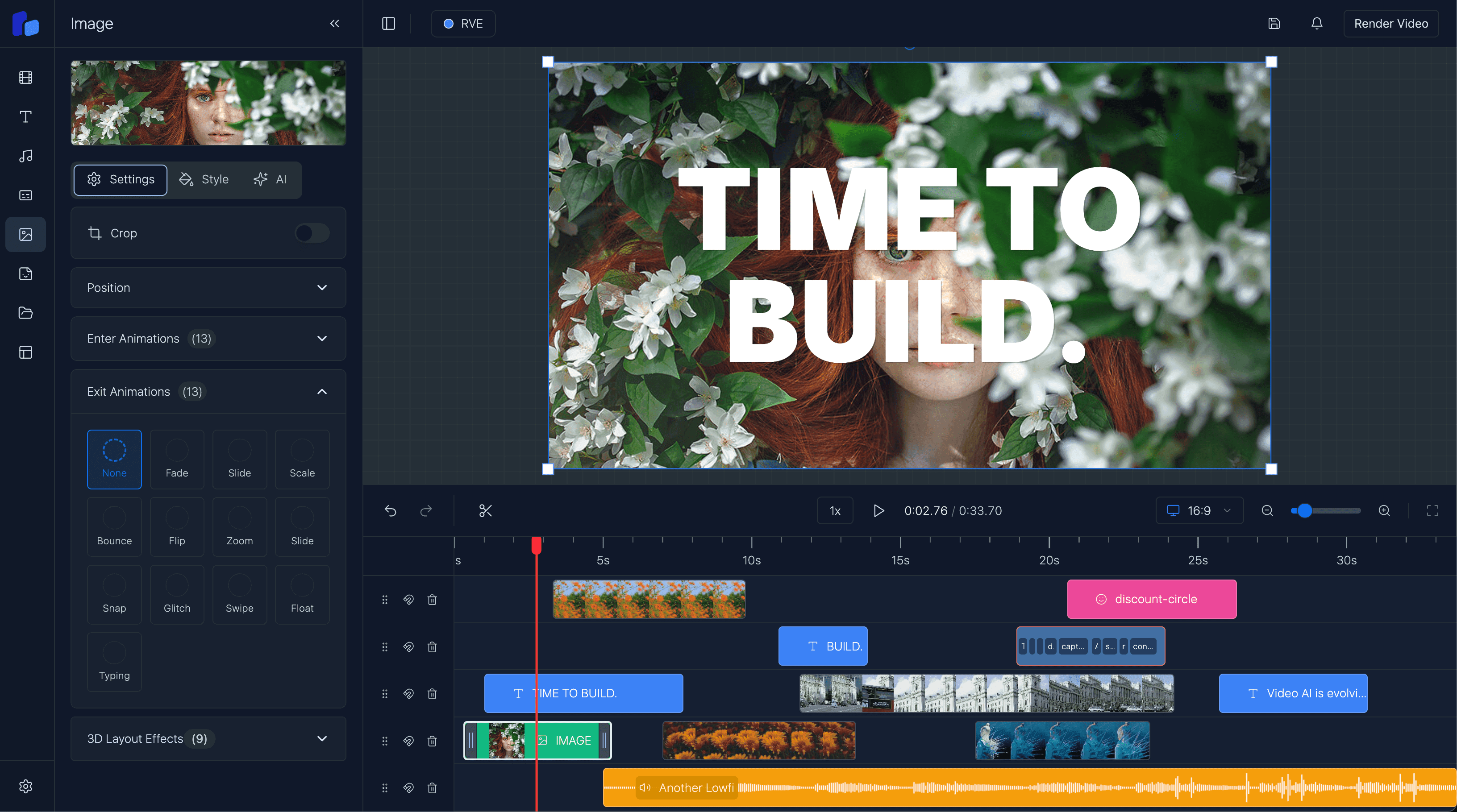
- timeline interactions for clips, text, audio, captions, and overlays
- selection and editing panels for item-level changes
- preview playback that stays in sync with the timeline
- a stable project schema for saving and restoring state
- hooks for uploads, templates, rendering, and export actions
- enough theming/control to feel native inside the host app
That is the difference between a demo widget and an editor foundation.
Option A
A simple component is enough when...
- Editing is a lightweight support feature rather than a core workflow.
- You already have surrounding systems for projects, assets, and exports.
- You mainly need a clean embedded UI surface inside an existing product shell.
Option B
You need a fuller editor foundation when...
- Users need timeline editing, captions, overlays, templates, and reusable project state.
- You still need to solve uploads, autosave, persistence, and export reliability.
- The editor sits inside a product buyers pay for, so failure states and polish matter.
The hidden trap: component thinking can be too small
A lot of teams search for a video editor component in React because it sounds like a UI problem.
Usually it becomes a systems problem very quickly.
As soon as real users start editing, they expect:
- imported assets to stay attached to the project
- timeline edits to persist reliably
- preview and export to agree
- captions and overlays to behave predictably
- permissions, templates, and product logic to work around the editor
That means the component matters, but the contract around the component matters just as much.
A better evaluation checklist
When comparing React video editor components, ask:
1. Is it actually embeddable?
Can it live inside your app shell, routing, auth model, and design system without feeling bolted on?
2. Does it expose a real project model?
If edits cannot be saved, restored, versioned, or transformed cleanly, the component will become expensive fast.
3. How much timeline behavior is already solved?
The hardest part is usually not rendering the UI. It is drag, resize, snapping, selection, zoom, and time-based consistency.
4. What still belongs to your app?
A component rarely replaces:
- storage and uploads
- permissions
- billing and plans
- templates
- rendering jobs
- analytics
- delivery workflows
5. Is the component shaping a real product path?
If you are building SaaS, AI video workflows, or a white-label editor, you probably need a component that fits a broader product architecture rather than an isolated toy.
What a good React editor component buys you
- A faster path to embedding real editing UX into your React app.
- More control than sending users to a separate external editor.
- A cleaner bridge between your workflow logic and the editing surface.
What it does not magically remove
- You still need app-specific integrations for uploads, persistence, and export.
- You still need product decisions around permissions, templates, and packaging.
- You still need to decide whether the editor is a feature, a workflow layer, or the product itself.
Where React Video Editor fits
React Video Editor is useful when you do not just want a generic widget.
You want a React-native editor surface that can live inside your product and connect to a broader workflow.
That is why it fits teams that are evaluating:
- a React video editor component for SaaS
- an embeddable editor for AI video apps
- a white-label editor inside an existing product
- a browser-based video editor component with timeline capabilities
If your main need is product-level embedding, read React Video Editor for SaaS. If your requirement is brand ownership and app-native UX, read White-Label Video Editor in React. If you are specifically evaluating the library/SDK angle, read Open Source React Video Editor: What You Get, What You Still Need.
FAQ
Is a React video editor component the same as a video player?
No. A player handles playback. An editor component also needs timeline state, item editing, project structure, and export-oriented workflow hooks.
Can I embed a video editor component into a Next.js app?
Yes. That is one of the strongest fits for a React-native editor component because you can keep the editor inside your own routing, auth, APIs, and app shell.
Is a component enough for a SaaS product?
Sometimes, but only if the rest of the workflow already exists. Most SaaS teams need a broader editor foundation plus app-specific integrations.
What is the difference between a React video editor component and a React video editor SDK?
A component usually emphasizes the embedded UI surface. An SDK framing usually emphasizes the broader foundation, extension points, and integration path around that surface.
Next step
If you want the editor to live inside your product, evaluate the workflow around the component too
The strongest integration is not just a mountable UI. It is a component that fits your app shell, project model, templates, and export path without forcing a rebuild of the editor baseline.